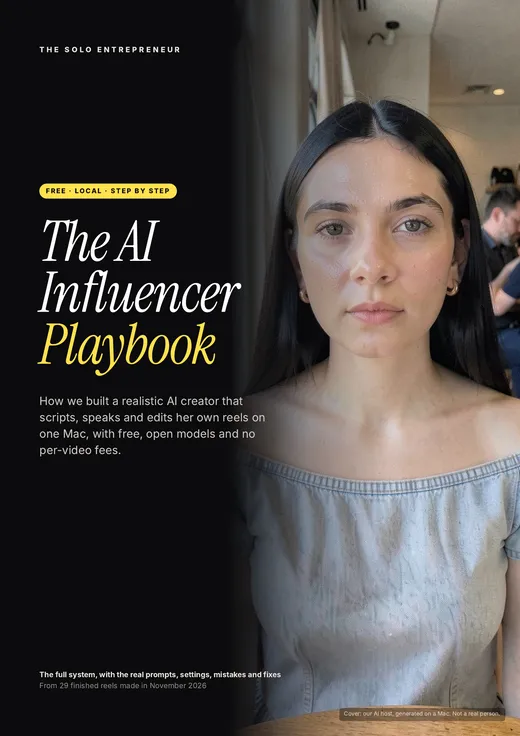
Download The AI Influencer Playbook
26 pages. The tool stack, the face and voice prompts, the talking-shot recipe, a fix-it guide for 16 problems and a per-reel checklist. Free, no signup.
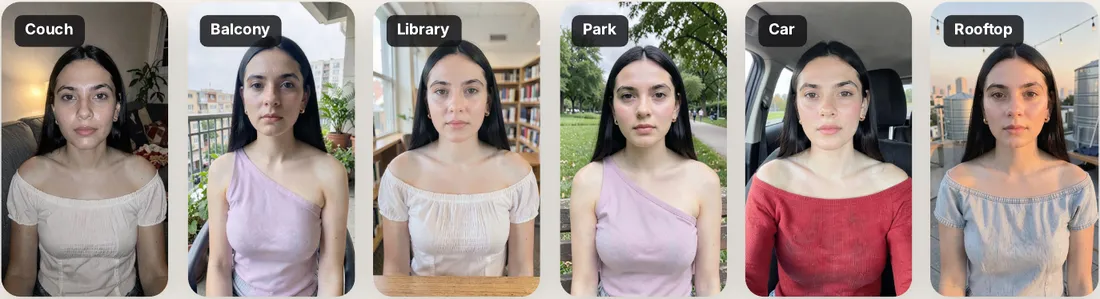
We wanted an educational creator who could post AI-tool and startup reels for founders every day, without a camera, a studio or a monthly avatar subscription. So we built one on a Mac mini, using open models that run offline. In eight days she made 29 finished reels.
The biggest lesson surprised us. Every jump in quality came from fixing an input (the starting photo, the voice pacing, a word in the prompt), not from more computing power. Most of this guide is about getting those inputs right.
What "free" means here, and what you need
Most guides that promise a free AI influencer send you to an app's free tier. Those come with watermarks, capped minutes and a monthly bill once you are hooked. This setup is different. Every model runs on your own computer, so the software costs nothing per video, forever.
| Free tier of an avatar app | This playbook (local, open models) | |
|---|---|---|
| Cost per video | Free until the credits run out | ₹0, always |
| Watermark | Usually | None |
| Your own original face | Often a stock avatar | Yes, designed by you |
| Works offline | No | Yes, once downloaded |
| What you need | A browser | An Apple-silicon Mac, 32 GB memory, 120 GB free disk |
| Speed | Minutes | A talking shot takes 7–40 minutes. Run it overnight |
So it is free, not instant. You plan reels a day ahead and let the Mac work while you sleep.
The ground rules before you build
An AI creator works because people trust faces. Earn that trust honestly or the whole channel is at risk. These eight rules are not optional.
- Say she's AI. Use the platform's AI label on every post (Instagram, YouTube) and say it plainly in the bio. Never present her as a real person.
- Consent for every voice. Only clone a voice whose owner has given clear, written permission. Never a celebrity, a client or a stranger.
- Invent the face. Generate an original face. Never use or "improve" a real person's photo without their consent.
- Clearly adult, never sexualised. Keep the styling tasteful, even for fashionable looks.
- No fake experience. She can explain and report. She cannot say "I tried this and made ₹1 lakh". No invented testimonials.
- Show your sources. Every number on screen comes from a real page, shown with its name and date. If you cannot source it, cut it.
- Teach safe tutorials. For outreach tutorials, teach drafting and reviewing before sending, an unsubscribe line, and local anti-spam law.
- Label recreations. If a screen is a recreation, not a real recording, tag it on screen as "demo recreation, sample data".
The free AI influencer tool stack
| Job | Tool | Model | Size |
|---|---|---|---|
| Talking video | ltx-2-mlx | LTX-2.5, 8-bit, distilled | 42 GB |
| Photos of her | mflux | FLUX.2 Klein 4B, 8-bit | ~8 GB |
| Voice clone | mlx-audio | VibeVoice 1.5B | ~6 GB |
| Transcripts | mlx-audio | Parakeet TDT 0.6B v3 | ~2 GB |
| Editing | Remotion | None. The edit is code | Small |
| Screen recording | Playwright + Chromium | None | Small |
| Audio and video glue | ffmpeg | None | Small |
| Checking takes | MediaPipe Face Landmarker | None | Small |
Why these? We tested LTX-2.3 against LTX-2.5 on the same line and the same photo and picked 2.5 by eye. FLUX.2 Klein makes a photo in about a minute and, more importantly, can edit one photo while keeping the face. That is how one face becomes a whole wardrobe. The LTX weights ask you to accept their licence on Hugging Face before you download them.
Never run the photo model and the video model at the same time. On 32 GB they fight over the GPU and one of them times out.
How to create an AI influencer for free in 8 stages
Every reel goes through the same pipeline. Stages 1 to 3 you do once. Stages 4 to 8 you repeat for every video.
1Set up your studio (2–3 hours, once)
You install three model families (video, image and voice) plus an editor. It is a one-time job of about two hours, most of it downloading. Keep the Mac plugged in, with sleep turned off during renders, because ours ran two to four times slower when it throttled.
You do not need to type the commands yourself. Open Claude Code or another coding agent in an empty folder, give it the install page from the playbook, and ask it to run the steps one at a time and explain each one in simple words. If you have not picked an agent yet, our AI coding tool comparison for India covers the options. Finish with a test: one 3-second clip. If it renders in about 7 to 10 minutes, you are ready.
Show the install steps (for the technically curious)
Page 8 of the playbook, shortened# 1. Developer tools, Homebrew, helpers
xcode-select --install
brew install uv ffmpeg node

# 2. The video model code
git clone https://github.com/dgrauet/ltx-2-mlx.git
cd ltx-2-mlx && uv sync --all-extras && cd ..

# 3. The video weights (accept the licence on Hugging Face first)
hf download dgrauet/ltx-2.5-mlx-q8 --local-dir models/ltx-2.5-q8

# 4. Photo and voice tools
uv tool install mflux==0.24.0
uv tool install --prerelease=allow mlx-audio==0.6.4
Sign in to Hugging Face with your own token and never share it. The full list, including the editor and screen recorder, is in the PDF.
One habit that saved us hours: keep one folder per reel, with voice/, shots/, stills/, the edit and out/ inside it. When something breaks, you can see exactly which input caused it.
2Design the face (one evening)
One great base photo is the foundation of everything. Write a description of who she is (age, background, styling, framing and light) and generate eight options with different seeds. Pick the one that feels most like a real person you would trust. Then never generate her from text again. Everything after this is an edit of that one photo.
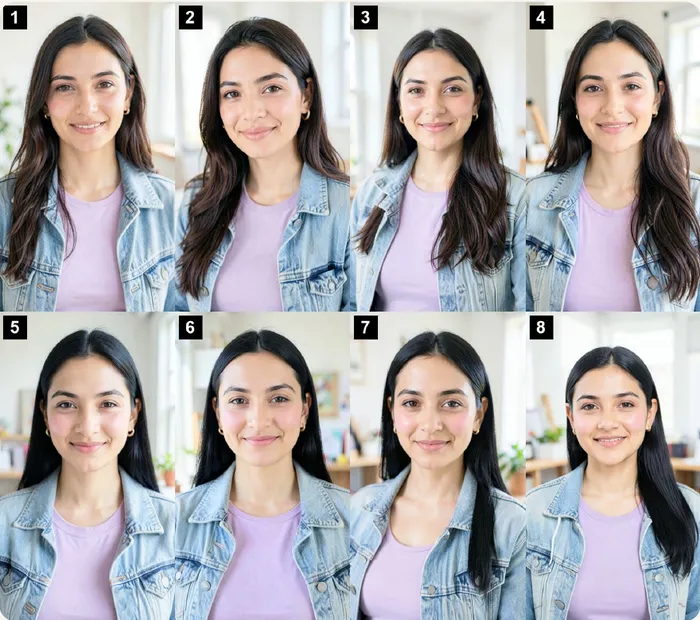
The face prompt we used (FLUX.2 Klein, seed 106)Candid photo of a beautiful 23-year-old adult woman, a recent college graduate, with a soft oval face, gentle almond eyes and long straight black hair tucked behind one ear. She wears very light natural makeup and tiny gold hoop earrings. Tight framing: head, shoulders and upper chest, facing the camera at eye level. Bright airy creator studio in soft natural daylight. Candid smartphone photo, natural skin texture, sharp focus.
Our first host looked older than intended, and viewers notice age instantly. State the age as "23-year-old adult" in the prompt and look at the photo at phone size before you commit.
One face, a whole wardrobe. To change her outfit, edit the base photo and describe only what changes. Start the prompt with a "keep" sentence that pins the face, hair, earrings and framing. We gave every reel its own outfit so the feed does not look like one video on repeat.
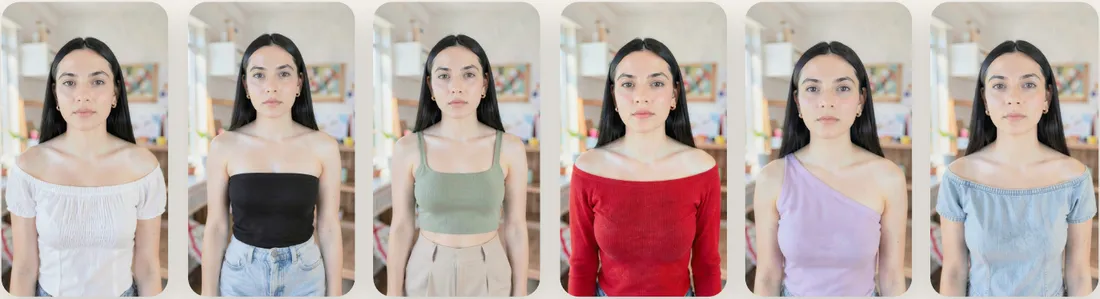
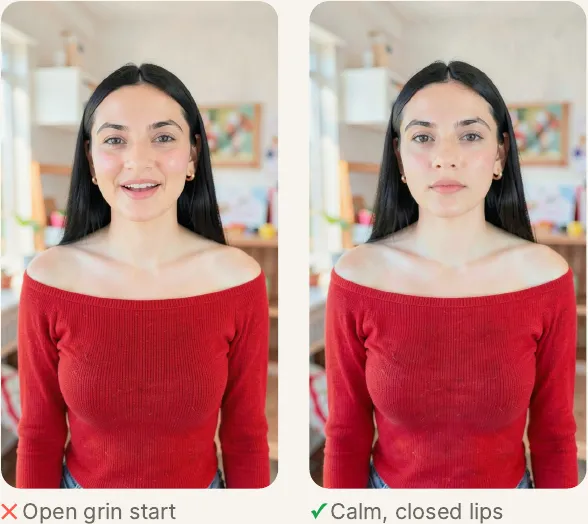
The calm-still rule fixed our lip sync. The video model pins the first frame of every talking shot to your photo. If that photo has an open-mouthed grin, her lips barely move for the first few words and every shot looks dubbed. The fix is a second edit of each outfit with only the expression changed, so her lips are gently closed with no teeth showing, as if about to speak. Use that calm still for every talking shot.
Make her feel real. Studio-perfect light makes an AI face look like an AI face. Putting her in real, lived-in places (a café, a couch, a balcony, a car) with natural light was the single biggest realism upgrade.
| Light that works | Light that backfired |
|---|---|
| Soft window daylight from one side | Hard side light. She aged ten years |
| Overcast outdoor light | Desk lamp plus laptop glow. Harsh and older |
| "The same youthful skin as in this photo" | Asking for "shine" on skin. She looked oily |
| "Filmed on a phone propped up in front of her, slight camera grain" | Hands tucked between her legs. They melted in video |
Hands are the first thing to break in AI video. Keep them out of frame with waist-up framing, or give them something simple and still to hold, like a coffee mug in both hands.
3Give her a voice that never changes
If each clip invents its own voice, viewers hear a different person every few seconds. So the voice is cloned once, and every line comes from that one clone.
- Get consent and a clean sample. 20 to 40 seconds of the person speaking naturally, with no music, recorded with written permission. We used a friend's voice, with her permission.
- Generate the whole script as one take. Joining separate lines sounds choppy. Make three takes with different seeds.
- Pick the take by transcript. Transcribe each take and keep the one whose words match the script best. It catches swapped words, like "send" instead of "save".
- Pace it. Leave a 0.3 to 0.5 second pause after every sentence. Slow a rushed take by 5% with the pitch kept.
Our cleanup step once deleted every pause longer than 0.09 seconds, and the reel sounded rushed. Shorten long gaps, but always keep a real pause between sentences. Voices also stumble on brand names, so respell them in the script ("Clawd" for Claude) and regenerate just that sentence.
4Write reels that work
The reels that perform in this niche are not a talking head for 40 seconds. When we studied top creators frame by frame, they were on camera only 25–33% of the time. The rest was big numbers, logos, real pages with highlights and product footage, with a sound on nearly every cut.
Two formats carried the series. The story reel takes a real startup or tool, a surprising number, how it happened, the lesson and a call to action. The tutorial reel opens with a problem, walks through numbered steps with real screen recordings, then shows the payoff.
- Hook in the first sentence, under 3 seconds.
- Every claim has a real source you can show.
- She explains. She never claims experience.
- Short sentences, with a pause after each.
- Fast or smiling lines go on a title card, not her face.
- End with one word to comment, and what they get for it.
Hooks that stopped the scroll for us: "If you can't find customers for your business, do this. It's free." and "Your next hundred customers are sitting on Google Maps."
5Make her talk
Each on-camera line becomes a short video. The model takes her calm photo plus that slice of the voice and animates her face, lips and head to match the audio.
- Cut the line out of the final voice. Start 0.06 seconds before her first word and end right on the last word. Trailing silence makes her freeze with her mouth open.
- Count frames. At 30 fps the model needs a frame count of 8n + 1 (65, 73, 97, 121, 145). Round the line's length up to the next one.
- Render two takes with two seeds. About one take in four fails, so you need the spare.
The prompt that finally workedShe is speaking the whole time, naturally, the way a person talks in a relaxed conversation. Her lips and jaw follow every word exactly, opening on the vowels and closing on m, b and p, and she only stops when the sound stops. Her eyebrows and forehead stay still and relaxed, her eyes stay wide enough open and look at the camera lens, blinking only rarely, and her head stays level and almost still. No exaggerated expressions, no wide eyes, no raised eyebrows, no grin, no clenched teeth. Same young woman with the same face, the same outfit, the same place and the same soft light as the first frame, filmed on a phone propped up in front of her.
| Line length | Frames | Render time | On a slow day |
|---|---|---|---|
| ~1.4 s | 41 | ~7 min | ~15 min |
| ~3.2 s | 97 | ~15–18 min | ~35 min |
| ~4.8 s | 145 | ~30–40 min | ~75 min |
Video models take every word literally. These words caused real failures in our takes:
| Don't write | What happened | Write instead |
|---|---|---|
| "selfie", "phone" | A second phone appeared in her hand in 3 of 4 clips | "filmed on a phone propped up in front of her", and say where her hands are |
| "no text, no logos" | Invented fake captions and logos | Leave it out entirely |
| "jaw drops", "eyebrows high" | Grimaces, clenched teeth, forehead lines | "no exaggerated expressions, no raised eyebrows" |
| "nodding", "leaning in" | Her head dropped out of frame | "her head stays level and almost still" |
| "smile between phrases" | Grinned through words, lips stopped moving | Calm mood. Let the voice carry the warmth |
| Shots of 6 s or more | Face and earrings drifted, memory ran out | Keep on-camera lines to 2–5 s and cut between them |
6Pick the best take
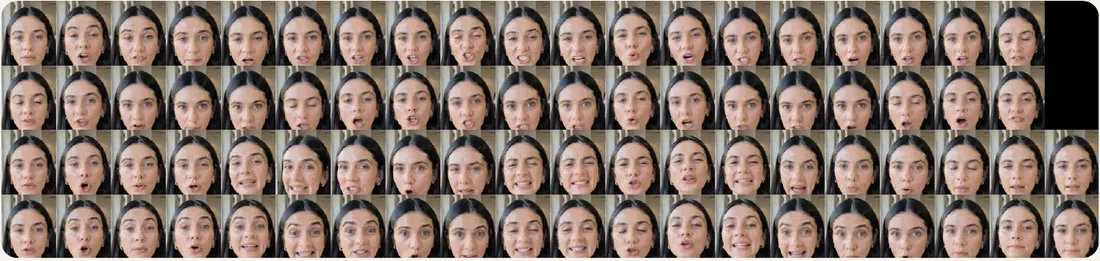
Watched at full speed, every take looks "fine". So we made two quick checks that turn a take into something you can judge in ten seconds. The first is a mouth strip: crop the mouth every few frames and label each crop with the word being spoken. Lips should close on m, b and p and open on vowels.

The second check tracks the face position from frame to frame and flags sudden jumps, or a face that grows because she is leaning into the lens. Reject a take if her mouth holds one open "O" for several words, her lips barely move, she grins or clenches her teeth, she leans toward the lens, her head jumps inside the part you use, or her eyes are closed on the first frame.
7Edit like a pro
The edit is where a reel earns attention. We built ours in code with Remotion, so every reel shares the same polished building blocks and every cut lands exactly on a word. A small set of scene types covers almost every reel, each on screen for 1.5 to 3 seconds with a sound on the cut.
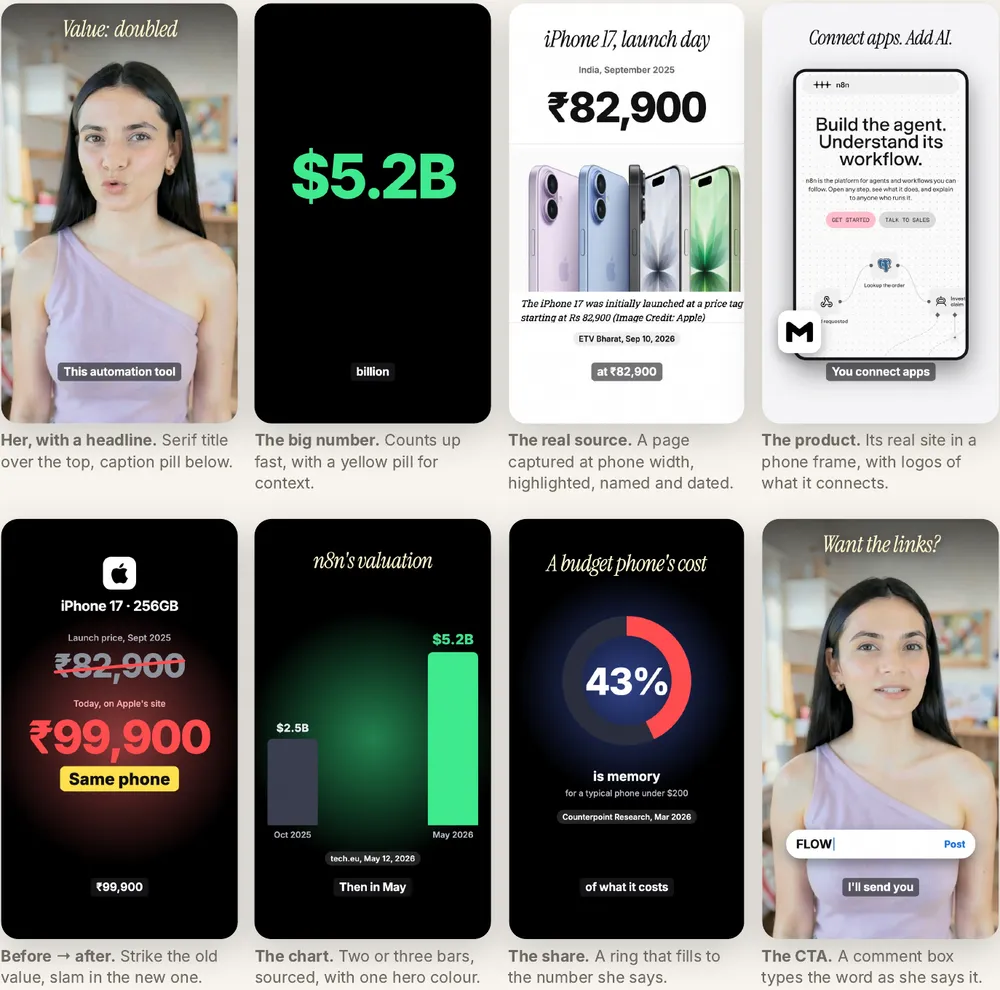
For captions, small grey pills of up to three words, placed low in the frame, looked far better than big yellow word-by-word captions. For tutorial steps, record at a tall window size (960 × 1100), show the address bar with the real URL, show the whole page first, and ring exactly what she names at the moment she names it.
If you would rather not build the edit from scratch, the free Motion Director skill turns a script into motion graphics, and the AI Reel Automation Engine turns a topic into a finished reel.
8Mix, check, ship
Put the voice on top, with music about 18–20 dB under it and a short whoosh or tick on most cuts. Aim for a final loudness around −14 LUFS with peaks below −1.5 dB. Then check every single reel before it goes out:
- Transcribe the finished reel and read it back. It catches misheard brand names.
- Make a contact sheet (one frame every 0.4 s) and scan it for blinks, grimaces and graphics sitting too high.
- Watch the first 3 seconds on a phone. Eyes open, lips moving, hook readable.
- Check every number against its source on screen.
- AI label on, sources in the caption, and the comment word matches the end card.
Run it every week
The trick is to separate thinking work (scripts, picking, editing) from machine work (voices and talking shots), and let the machine work overnight.
| When | You | Your Mac |
|---|---|---|
| Evening | Research 3–5 topics, write scripts, pick outfits | Voice takes (~5 min per reel) |
| Night | Sleep | Talking shots: 2 takes × 3 lines × 5 reels (6–10 h) |
| Morning | Pick takes with the mouth strips (10 min per reel) | Idle |
| Day | Edit, mix, check (45 min per reel) | Renders the edits (3–5 min each) |
| Next evening | Schedule posts, reply to comments | Next batch |
Queue every shot of every reel in one script and set a completion alert for each reel, not just the first. We once had a finished reel sit unnoticed for two hours.
Common AI influencer problems and how to fix them
| You see | Why it happens | Fix |
|---|---|---|
| Lips barely move on the first words | The starting photo has an open grin | Use a calm, closed-lip still for every talking shot |
| First words look dubbed | The scene starts before the shot's audio does | Start the scene exactly where the shot starts in the voice |
| Mouth stuck in an "O", or a frozen grin | A fast or smiling line, or a bad seed | Try a second seed. If both fail, use a title card |
| A second phone in her hand | "selfie" or "phone" in the prompt | Remove those words and say where her hands are |
| Face or earrings drift | The shot is too long | Keep lines under 5 s and join shots in the edit |
| Hands melt | Hands moving or tucked away | Keep them out of frame or holding a simple object |
| She looks older or oily | Hard light, or "shine" in the prompt | Soft daylight and "the same youthful skin" |
| Render 2–4× slower than usual | The Mac is throttling or swapping memory | Plug in, stay awake, run one model at a time |
The playbook has all 16 problems we hit, plus a printable per-reel checklist.
Option B: use your own face
We also cloned a real face, with full consent, because it was our own. What worked was starting from a clean, well-lit photo of the real person rather than an AI redraw (the redraws never looked like them), then using the same talking-shot recipe with the calm prompt and lines kept to 2–3 seconds. What failed was lip-dubbing existing footage, where the lips did not match, and pasting a real face onto generated photos.
Frequently asked questions
Is it really free to create an AI influencer this way?
The software is. Every model and tool here is free and open and runs offline once downloaded, so there are no watermarks, credits or per-video fees. Your costs are the Mac, electricity and your time.
Can I do this on Windows or a cheaper laptop?
The playbook is written for an Apple-silicon Mac with 32 GB of memory and about 120 GB of free disk. The same open models have versions for NVIDIA graphics cards on Windows and Linux, but the commands differ and we have not tested that route. On less memory, expect timeouts on the video model.
How long does one reel take?
About 75 to 90 minutes of your time for a 35-second reel, plus one to two hours of machine time that can run overnight.
Do I have to tell people the influencer is AI?
Yes. Turn on the AI label on every post, say it in the bio, and never let her claim results she did not have. Instagram and YouTube both ask creators to disclose realistic AI content.
Can I build a business on an AI creator?
The skill is more valuable than one channel. Brands pay for this kind of content, and our guide to starting an AI UGC content agency in India covers how to sell it. Keep the ground rules above, because a brand will not risk its name on a creator who misleads viewers.
Start with chapter 2 tonight
Generate eight faces and pick one. By the weekend your first reel can be rendering while you sleep. Everything you need is in the PDF.
Stuck on a step, or want help planning your own creator? Book a 1:1 call. Founders building with AI every week also share what is working inside Founders Wing.