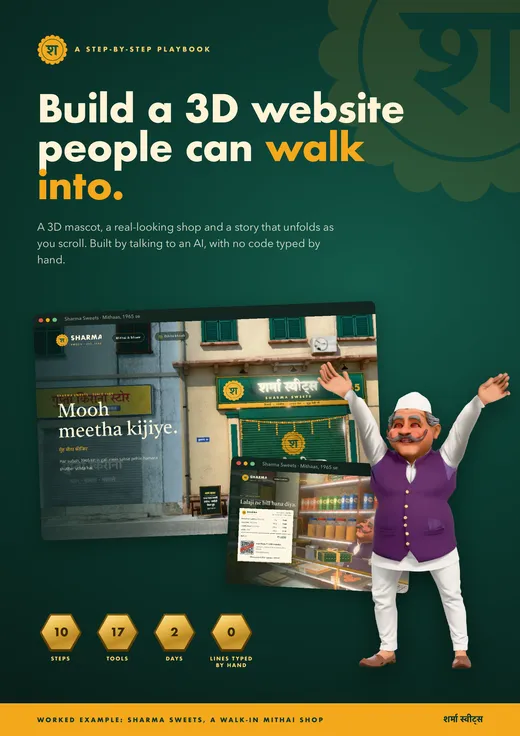
Download the 3D Scroll Website Playbook
15 pages. Every step, every prompt we used, the eight bugs we hit and how each one got fixed. Free, no signup.
Most "3D website" tutorials assume you already write JavaScript. You open one, see a wall of three.js code, and close the tab. This guide assumes the opposite. You are the director. You decide the story, look at what comes back and say what feels wrong. Claude Code is the crew that writes the code, runs Blender and checks its own work in a browser.
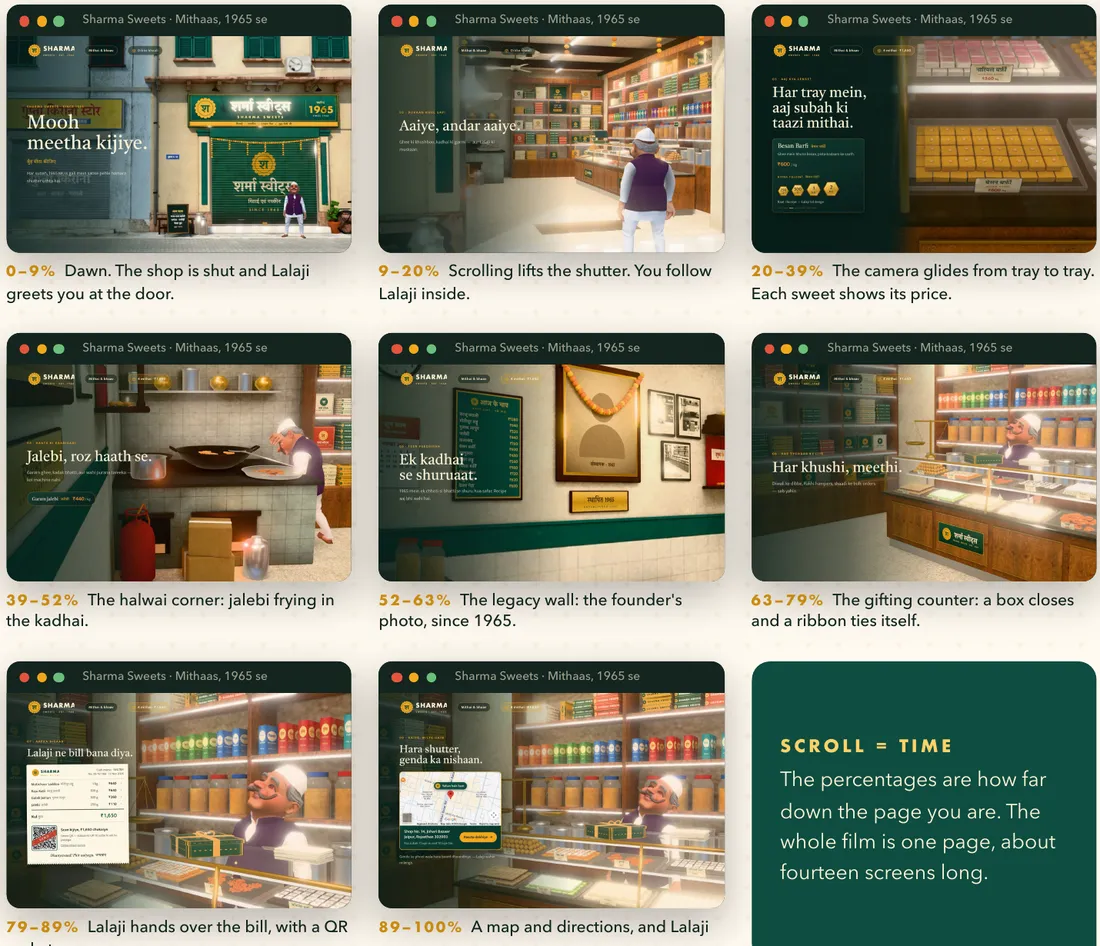
The worked example is Sharma Sweets, a made-up mithai shop from 1965. When the page opens, the shutter is down and Lalaji, the shop's mascot, is standing at the door. You scroll, the shutter goes up, you follow him inside, the camera glides along the sweet counter, he packs a box, hands you a bill with a pay-by-QR code, and waves you off with directions to the shop.
What is a 3D scroll animation website?
It is a normal web page with a 3D scene sitting behind it. Your words (headlines, prices, buttons) scroll past on the left like any other page. The scene behind them never scrolls away. Instead, how far down the page you are becomes a number from 0 to 100%, and that number decides where the camera is and what the mascot is doing.
So the scrollbar is the film's timeline. At 0% the camera is on the street at dawn. At 100% Lalaji is waving goodbye. Scroll back up and the film runs backwards, shutter and all.
What makes it feel like a film and not a slideshow is one rule. Each chapter holds a single camera shot while you read. Between chapters, the text fades out, the camera travels, and the next text fades in. Words and moving things are never on screen at the same time.
Video frames or real 3D: two ways to build one
There are two common ways to make a scroll website feel three-dimensional, and they suit different projects.
| Video frames (Apple AirPods style) | Real 3D scene (this playbook) | |
|---|---|---|
| How it works | An AI video is cut into frames, and scrolling flips through them | A 3D model of the place sits in the page and a camera moves through it |
| Best for | One product turning, opening or assembling | A place people walk into: a shop, café, studio, showroom |
| Can visitors interact? | No, it plays the same every time | Yes. Pick a weight, add to a box, get a bill |
| Effort | An afternoon | About two days |
| Where to start | Scroll-Site Generator skill (free) | The playbook on this page (free) |
If you only need one product looking beautiful, the Scroll-Site Generator skill is faster. If you want a world with a character in it, read on.
The tools: 17 in total, and you only touch four
You use four tools yourself: the Claude app, an AI image generator, Tripo and Mixamo. Claude installs and runs everything else. You never open Blender.
| Job | Tool | What it does | Cost |
|---|---|---|---|
| The builder | Claude Code (desktop app) | Writes the code, runs Blender, tests the site in a browser | Paid plan |
| The mascot | Any AI image generator | A front and back picture of your character in a T-pose | Varies |
| Tripo AI | Turns the picture into a 3D model (.glb) | Free credits + paid | |
| Mixamo | Adds a skeleton and ready-made animations | Free | |
| The world | Blender | Builds the shop, lights it, renders it. Claude drives it | Free |
| Poly Haven | Real wood, plaster, tile and metal surfaces | Free | |
| The website | three.js | Shows 3D models inside a web page | Free |
| GSAP ScrollTrigger | Ties animation to how far the visitor has scrolled | Free | |
| Lenis | Makes scrolling glide instead of jump | Free | |
| Finishing | glTF-Transform | Shrinks 3D files. Our mascot went from 19.8 MB to 5.6 MB | Free |
The other seven run quietly in the background: Node.js, Vite, Pexels and Unsplash for reference photos, headless Chrome for drawing signboards with correct Hindi lettering, Google Fonts, Google Maps and a small QR-code library. The full list with links is on page 4 of the PDF.
On cost, Claude Code needs a paid Claude plan. Pro was ₹2,399 a month when we compared AI coding tools priced in rupees. Almost everything else is free. Prices change, so check each tool's own site on the day you start.
How to build a 3D scroll website with Claude Code in 10 steps
Each step ends with something you can look at. Do not start the next one until you like what you see.
1Set up the workshop (about 15 minutes)
Install the Claude desktop app and open its Code tab. Install Node.js (the LTS version) and Blender. Make free accounts on Tripo and Mixamo. Create an empty folder, open it in Claude, and save two or three pictures with the mood you want. They are references for the feeling, not things to copy. Then send your first message:
Your first promptThis is a new project for a 3D mithai shop website. Please:
1. Create these folders: assets/character/1-images, assets/character/2-model, assets/character/3-animations, assets/references, public/models.
2. Check that Node.js and Blender are installed on this computer, and tell me where Blender is installed.
3. Show me the final folder structure.
I'm not a coder, so explain anything I need to do in simple words.
2Make the 3D mascot
This is the part people ask about most. A picture becomes a 3D model, the model gets a skeleton, the skeleton gets animations, and Claude packs it all into one small file.
- YouGenerate a front and a back picture of your character, arms straight out in a T-pose, on a plain background.
- YouUpload them to Tripo and download the 3D model as a .glb file.
- ClaudeConverts the .glb to .fbx in Blender so Mixamo accepts it.
- YouIn Mixamo, place the markers on chin, wrists, elbows, knees and groin. Download an idle animation "With Skin", then every other move "Without Skin", all at 30 fps.
- ClaudeMerges every animation into one character, compresses it, and builds a test page with one button per move.
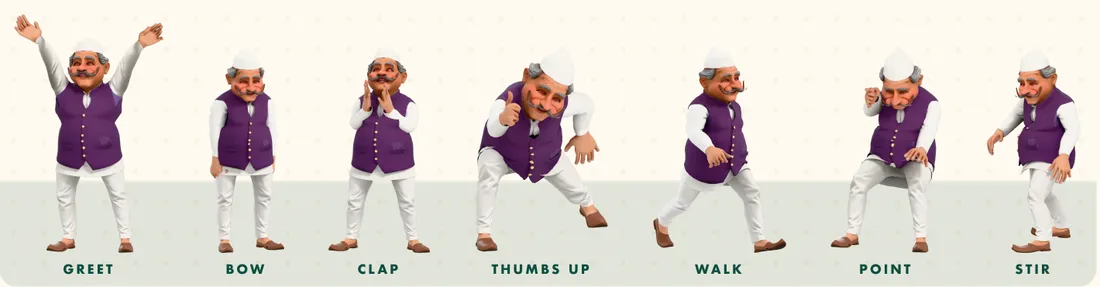
Keep the arms well away from the body in your picture. If they touch, Mixamo cannot tell where the elbows are. And if clothes stretch like rubber when the character walks (Lalaji's kurta did), describe exactly what you see and ask Claude to render the whole body frame by frame before it guesses at a fix.
3Write the brief and ask for a plan first
This is the most important step in the playbook. Do not ask for "a 3D website". Describe the film you want, set the rules, and ask for a plan before any code is written. The brief we used has seven parts:
- Big picture. What the shop is, since when, for whom, and who the mascot is.
- Assets. Where the character file and reference pictures live.
- Colours and lettering. Background, text and accent colours, and the tone of the copy (ours was warm, short Hinglish).
- Story by scroll percentage. "0–15%: what the visitor sees, what the mascot does." This turns "make it cool" into chapters the AI can build and you can judge.
- Layout rule. Text on the left, 3D on the right or centre, and text must never overlap the mascot or the products.
- Negative rules. Must not lag on mid-range Android phones. Show a loading screen. Respect people who switch motion off.
- Phases. "Build Phase 1 only, then stop so I can check it." End with "If you are confused about anything, don't assume. Ask me."
The full fill-in-the-dots brief is on page 8 of the PDF. Expect your first plan to be wrong somewhere. Ours was. Three phases in, we looked at the result and said: "It doesn't look like real websites at all. Sweets don't look like real sweets." We threw that idea away, kept the foundation, and the rest of the playbook is the second plan. Building in phases is what made that change cheap.
4Build the world in Blender
We built the shop three times. Version one drew laddoos and jalebis as simple shapes in code, and they looked like toys. Version two was a Blender shop at night that still felt like a game level. Version three was a real bazaar shop by day, with a painted shutter, Hindi signboards, twenty kinds of sweets in steel trays, a calendar and a small mandir. The prompt that got us there was a plain one.
The prompt that fixed itThe shop doesn't look realistic to me. We have Blender, we could use it to develop a realistic website. Please build it like a real shop, and instead of night, let's make it day.
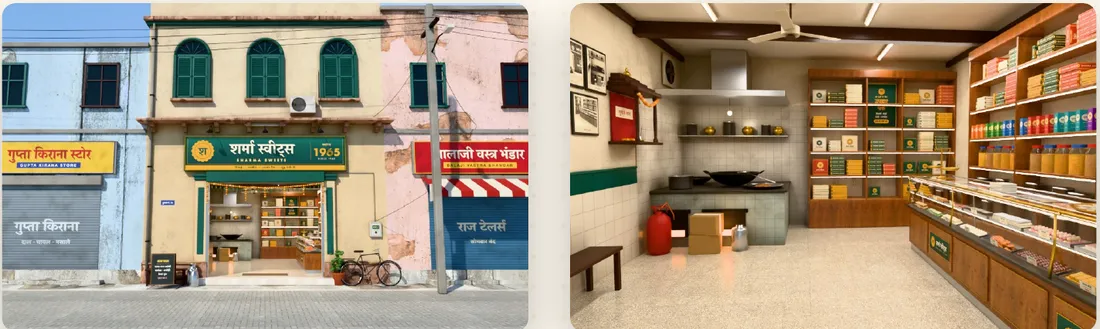
Ask Claude to check how real Indian sweet shops look before designing. Have it build everything from a script, so changing the recipe rebuilds the shop in seconds. Then bake the lighting. Blender spends minutes working out sunlight and soft shadows once and saves the result as pictures, so a visitor's phone has almost nothing left to calculate. Our shop came to 165,000 triangles and shrank from 17.9 MB to 10.8 MB.
5Direct the scroll story
The story started as one paragraph: the shutter is closed when the site opens, the character stands at the door, he opens it, and inside is a beautiful shop. That became eight chapters, each with a share of the scroll, one camera shot and one job for the mascot.
| Chapter | Scroll | Camera | Mascot |
|---|---|---|---|
| Dawn | 0–9% | Wide street view, pushing in | Greets you at the door |
| Shutter | 9–20% | Close on the shutter | Lifts it, tied to your scroll |
| Counter | 20–39% | Close-ups, tray to tray | Waits behind the counter |
| Halwai | 39–52% | Over the kadhai | Stirs the jalebi |
| Legacy | 52–63% | The photo wall | Keeps cooking, off screen |
| Gifting | 63–79% | Across the counter | Bows as the box closes |
| Bill | 79–89% | Moves in on Lalaji | Hands over the bill |
| Visit | 89–100% | Stays with Lalaji | Waves you over |
Four rules made it feel directed. Text holds while a shot holds, then fades before the camera travels. The mascot walks to where the story wants him at human speed, so scrolling fast makes him hurry but never teleport. Only one or two hero moments, like the shutter, are tied directly to the scrollbar. And Claude wrote a checker that walks the whole story at three screen sizes and reports the smallest gap between text and subject in pixels.
6Showcase the products inside the story
Our first product section was a grid of cards at the bottom of the page. It worked, but it broke the spell, because you had to leave the shop to read a menu. So we asked for the sweets to live inside the counter instead, with the camera zooming into one tray and then moving to the next, the way you browse in a real shop.
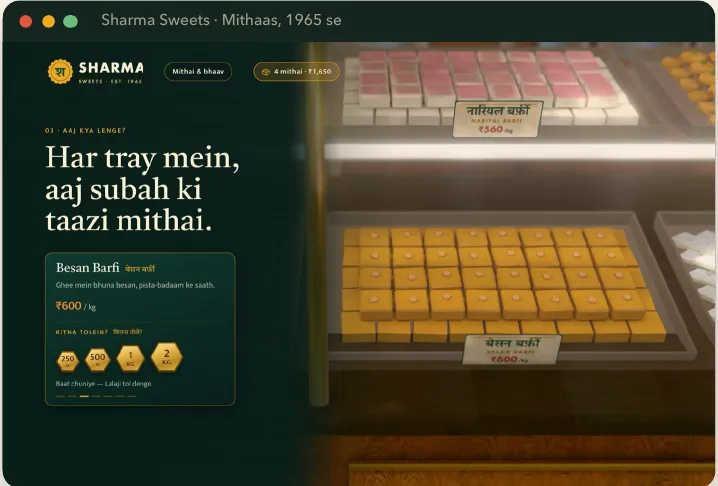
Keep every price in one list so the card, the price tags in the scene and the bill all read from the same place. Put the text on a solid panel during close-ups so trays never slide underneath the words.
7Polish for realism
Once the site worked, we asked one open question: "How can we make this website more realistic and better?" Claude came back with options. We picked one and got syrup gloss on the jalebi, lens blur on trays behind the one in focus, a real sky, ceiling fans that turn and a marigold toran that sways. Pick one improvement at a time. Ten at once means ten things to check.
8Brand it
The shop began as a made-up name. Changing it to Sharma Sweets took one prompt ("Assume we are Sharma Sweets. Build its branding from scratch and implement it.") because the name, colours and logo live in one small file that everything else reads. Claude designed a marigold seal, redrew the signboard, shutter, boxes and price tags, and re-lit the shop. Use a brand of your own. Putting a famous company's name on your shop makes visitors think they stand behind you.
9Let people order
The showcase became a shop with one more prompt. Visitors tap a brass weight (250 g, 500 g, 1 kg or 2 kg), the item hops into a box in the header, and at the end Lalaji hands over a paper bill with a QR code for the total, then a map with directions. Before launch, fill in your real UPI ID (until then the QR is stamped DEMO and cannot take money), your WhatsApp number so orders reach you, and your real address for the map pin.
10Check, fix, ship
Half the work is looking. Say what you see, not how to fix it. "His kurta is getting stretched when he walks" is a perfect bug report. Change one thing at a time, and say "love it" when something is right, because the AI keeps what you praise. Then ask Claude to prove its work: screenshots at two or three screen sizes, the smallest text-to-subject gap in pixels, a clean final build, and a list of what it could not check.
Eight things that went wrong, and what fixed them
None of these were found by reading code. Every one was found by looking at the screen and saying "that looks wrong".
| What we saw | The cause | The fix |
|---|---|---|
| Sweets looked like toys | They were shapes drawn by code | Modelled them in Blender, in real trays, under real light |
| The shop felt fake | Night lighting and empty space | Daylight, and the clutter of a real shop |
| Everything was too dark | A colour setting was wrong on export | Asked why the site was darker than the Blender picture. One fix, three times brighter |
| Lalaji's kurta stretched | Only his hips were held in place while walking | Held every bone in place, rendered full-body frames to confirm |
| He jumped when scrolling fast | His position was tied directly to the scroll | He now walks to where the story wants him |
| Trays slid under the text | The camera moved behind see-through text | A solid panel behind the text during close-ups |
| He lunged into the counter | A big "thumbs up" in a close shot | Swapped it for a small bow |
| The map was sometimes blank | It waited for a signal some browsers never sent | It now loads when the story reaches the last counter |
The 10 Claude Code prompts that did the work
Every one is a real message from the build, and none contains a technical word.
- "I'm not a coder, so explain anything I need to do in simple words."
- "Don't write code yet. First make a plan."
- "Build Phase 1 only, then stop so I can check it."
- "If you are confused about anything, don't assume. Ask me."
- "Check how real shops look, then design it."
- "It doesn't look realistic to me."
- "Love it. Now make the character's movement smooth throughout."
- "When he is walking his kurta is getting stretched."
- "How can we make this website more realistic and better?"
- "Make it creative somehow." (This one gave us brass weights and a paper bill.)
Ask Claude to remember what you approved, what you rejected and why. It saves you explaining the story twice when you come back the next day.
Before you share the link
- Real prices. Ours were still placeholders.
- Real address and map pin. The demo points at an example street.
- UPI ID and WhatsApp number. So payments and orders reach the shop.
- Your own photos. The founder's portrait and the shopfront.
- Test on a phone. Our build was about 18 MB, which is too heavy for mobile data. Shrink it before launch.
- Reduced-motion check. For visitors who switch animation off in their phone settings.
- Put it online. Ask Claude to deploy it to a web host. We had not done this step when the playbook was written.
Frequently asked questions
Do I need to know how to code?
No. Your job is to describe the story and react to what you see. Claude Code writes the code, runs Blender and tests the site. If you can say "the shop looks fake" or "he's walking into the counter", you can direct this.
How long does it take?
The Sharma Sweets build took two days, including one full restart after the first plan. Step 1 takes about 15 minutes. The mascot and the shop take the longest.
Can I use Cursor, Codex or Lovable instead of Claude Code?
The prompts and the order of steps carry over to any agent that can run programs on your computer, because the AI has to drive Blender and open a browser. Browser-only builders like Lovable cannot run Blender. If you are still choosing, our comparison of AI coding tools in India covers what each one is good at.
Will it work on phones?
It can, if you plan for it from the brief. Baked lighting and compressed models do most of the work, but test on a real mid-range Android phone before you share the link.
What kind of business suits a 3D scroll website?
Any place people enjoy walking into: a bakery, a tailor, a bookshop, a chai stall, a café or a showroom. Give it a character and tell its story one scroll at a time. If you want ideas for the business itself, start with our startup ideas for India.
Keep the playbook open while you build
All ten steps, the full brief template, the mascot prompts and the launch checklist in one PDF.
Want a second pair of eyes on your build, or help picking the story for your own business? Book a 1:1 call. Founders building with AI every week also trade notes inside Founders Wing.